
Start from a base. Build the rest yourself.
There’s no tier four of seven here. Every event starts from one base package for your kind of night, and everything after that is a choice you make — twenty-two options for a wedding, and you take only the ones that matter to you.
Three steps, in your own time
Check your date, create your ideal package, and book online when you’re ready.
Pick your base
One base package for your kind of event — wedding, private party, corporate, karaoke party, or a series of karaoke shows for a venue. That’s the night covered: me, the equipment, the music, and setting it all up and taking it away again.
Add only what you want
Uplighting, ceremony microphones, a monogram with your names in it, a second venue, subwoofers, an audio guestbook, karaoke after the formal part of the night. Nothing is bundled in to force your hand, and nothing you skip turns up on your quote.
Mix and match to compare
Finish a build and the total price comes straight back, free. Change something, build it again, and compare the two side by side. Most people put together several before they settle on one, and nothing is committed until you book.
Five bases, one for each kind of night
Each one covers the event itself before you add a single option.
Wedding and reception
The whole day if you want it, run by the person you plan it with.
- Online planning suite with ultimate flexibility
- Unlimited consultations
- DJ, equipment and music
- Wireless reception mics
- Backlit DJ booth and towers
- Basic dance lighting
- MC services to engage your guests and keep the night moving
- Travel
- Setup and teardown
Private party
Birthdays, anniversaries, graduations, reunions, holiday parties.
- DJ, equipment and music
- Private online planning account, including the playlist builder — my music database, enhanced with Spotify, where you create your own playlists
- Optional Guest Request System, so guests can suggest songs before the night
- Travel
- Setup and teardown
Lean on equipment, not on planning. Lighting, karaoke, subwoofers and the rest come from the catalog below, so a party never carries a wedding’s worth of equipment it didn’t ask for — but you still plan it in the same account, with the same tools.
Corporate event
Awards nights, conferences, holiday parties and team events, where the microphone work matters as much as the music.
- DJ service with MC option
- Online event planning tools
- Access to a wireless microphone
- Backlit DJ booth and vertical trusses
- Dual derby dance floor lighting
- Travel
- Setup and teardown
Karaoke party
A hosted karaoke show as the event itself, with guests requesting from their own phones.
- DJ and karaoke host
- Karaoke tracks
- Speakers and equipment
- Microphones and monitor
- Travel
- Setup and teardown
Karaoke show series
For bars, restaurants and venues building a regular weeknight crowd.
- Four hosted shows of three hours each
- Twelve hours in total
- Weekday nights
- Booked as a block rather than one show at a time
Which add-ons are available depends on the event type. The wedding catalog is the largest, at twenty-two.
Add exactly what you want
Nothing here is bundled into anything else. Take one, take ten, take none.
Coverage and staging
- 1 StationIncluded with every package. Booth, sound and lighting in one location.
- 2 StationsAudio set up in a second area at the same venue.
- 3 StationsCeremony, cocktail hour and reception in three different areas.
- 4 StationsFour consecutive audio stations at one address.
- Second venueA DJ station at a second address, for a ceremony and reception that aren’t in the same place.
- Assistant DJFrees me from the equipment to work the room. Worth it above about 200 guests.
Ceremony audio
- Off-grid ceremony audioFully battery-powered sound for a ceremony where there is no power to reach — a hilltop, an orchard, a barn field, the far end of a vineyard. No generator running behind the vows, and no cables taped across the lawn.
- Ceremony mic, standardOne handheld wireless, usually held by the officiant.
- Ceremony mic upgrade, officiant onlyA bodypack with a discreet lavalier. Hands free, and nothing between the two of you in the photographs.
- Ceremony mic upgrade, full setThree bodypacks and three lavaliers, for the couple and the officiant — so your vows are audible to the back row, not just the front.
Lighting and atmosphere
- Uplighting, 8 fixturesEstimate one per 12 feet of wall, or one per 10 guests.
- Uplighting, 16 fixturesTake both packages for 24 in total.
- Upgraded dance floor lightingA larger, more capable rig than the basic dance lighting in the base package.
- Fog or faze machineMakes the light beams visible in the air. It’s what takes lighting from flat to three-dimensional.
Personalization
- Your names in lightA custom monogram projected onto a wall, the floor or the ceiling.
- Name in lights, deluxe animationThe same monogram, animated.
Audio-visual
- ProjectorEpson PowerLite 1940W WXGA 3LCD with a stand. You supply the files.
- Projection screenScreen and stand, up to 120 inches on the diagonal. Indoor only.
Extras
- Audio guestbookAn elegant phone your guests leave voicemail messages on through the night. You keep the digital files.
- Reception karaokeKaraoke tracks, monitors and wireless mics, once the formal part of the night is done.
- Karaoke for a party or eventThe same thing, added to a private party or a corporate event.
- SOS emergency bookingFor a booking made 48 hours or less before the event. It happens more often than you would think.
Sound
- Subwoofer pairDual subs for low end you feel rather than hear. For a room that wants the dance floor to sound like a club.
Three places to start
Twenty-two options is a lot to face from a standing start. These three go together well. They aren’t tiers, nothing is fixed, and you can change any line of them.
Ceremony and reception, one venue
- 2 stations
- Ceremony mic upgrade, officiant only
- Uplighting, 8 fixtures
- Your names in light
The ceremony gets its own sound instead of borrowing the reception’s, the vows carry to the back row, and the room is already lit before anyone dances.
The dance floor
- Upgraded dance floor lighting
- Fog or faze machine
- Subwoofer pair
- Uplighting, 8 fixtures
For the night that’s really about dancing. The haze isn’t decoration: with it you see the whole beam in the air, and without it you just see the dots.
The full production
- 3 stations
- Ceremony mic upgrade, full set
- Uplighting, 8 and 16 — 24 fixtures
- Name in lights, deluxe animation
- Assistant DJ
- Audio guestbook
A bigger guest list spread across several spaces. Above about 200 guests an assistant does more for your night than any light will — it puts me out in the room with your guests instead of stuck behind the equipment.
What planning with me actually looks like
This is the part you can’t see from the outside, and it’s most of what you’re paying for. It opens the moment your date is booked.
Your own client area
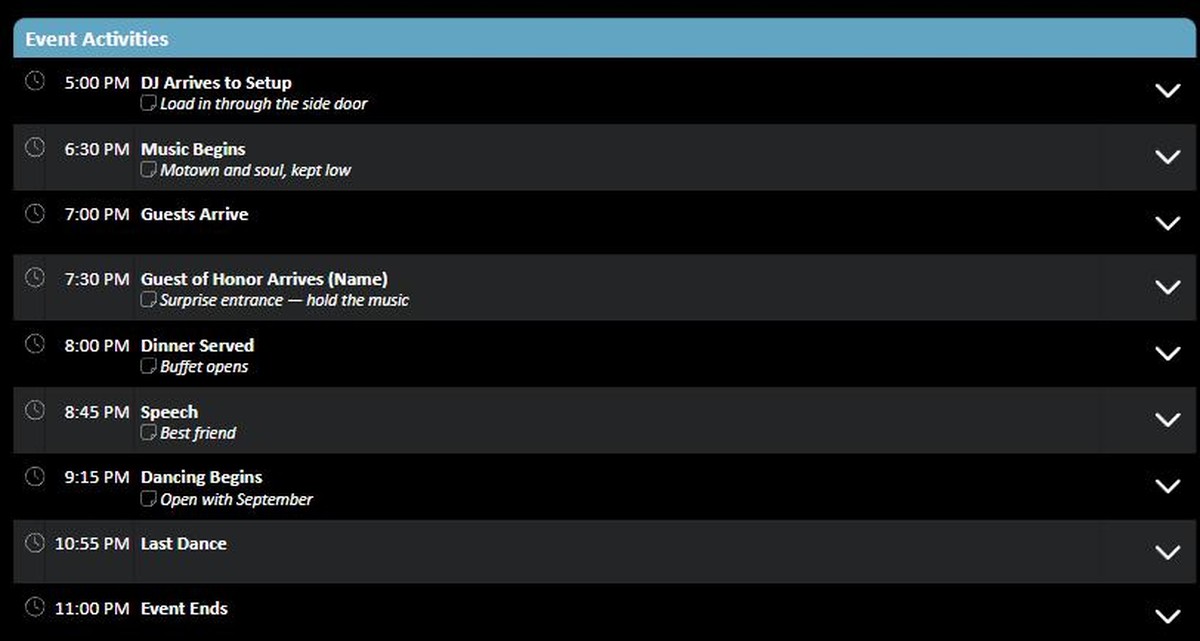
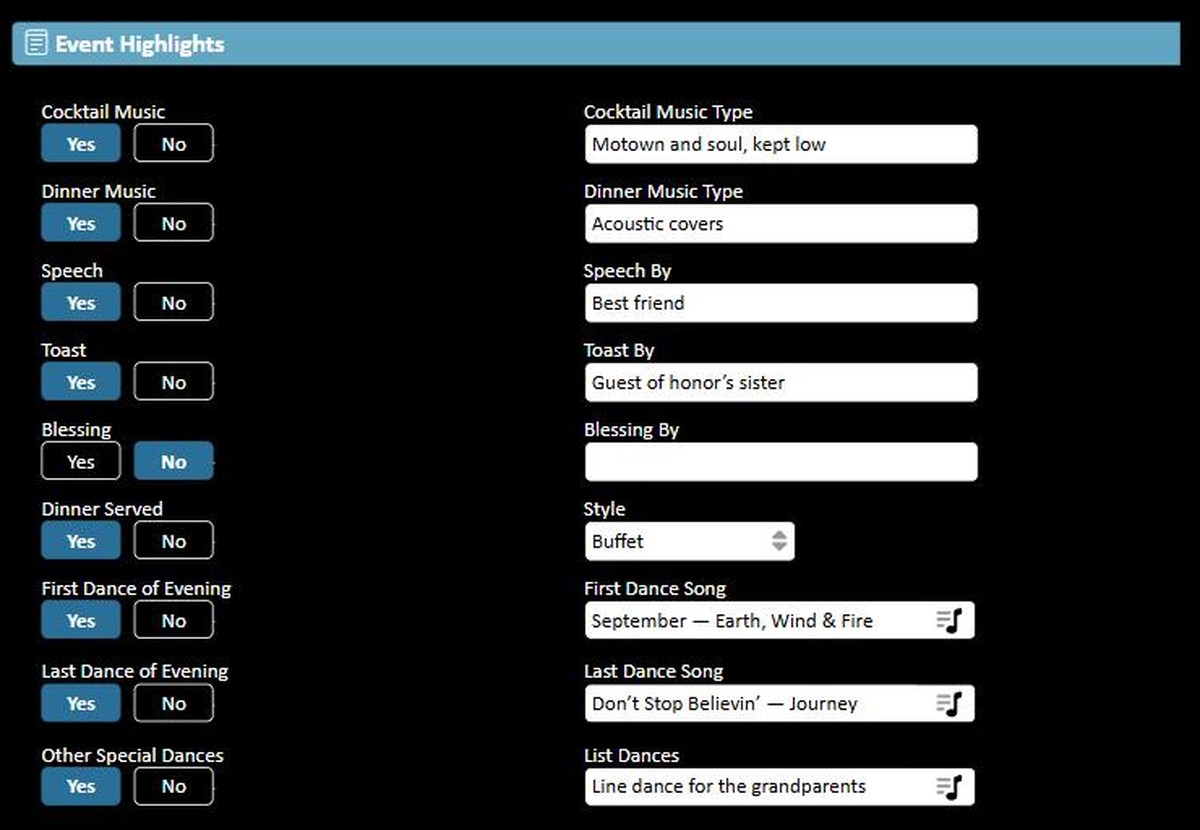
Planning forms, guest details and the event timeline in one place, open whenever you happen to have ten minutes, not just when I’m free. Everything you enter is what I run the night from, so nothing gets lost between a phone call and the day.
The playlist builder
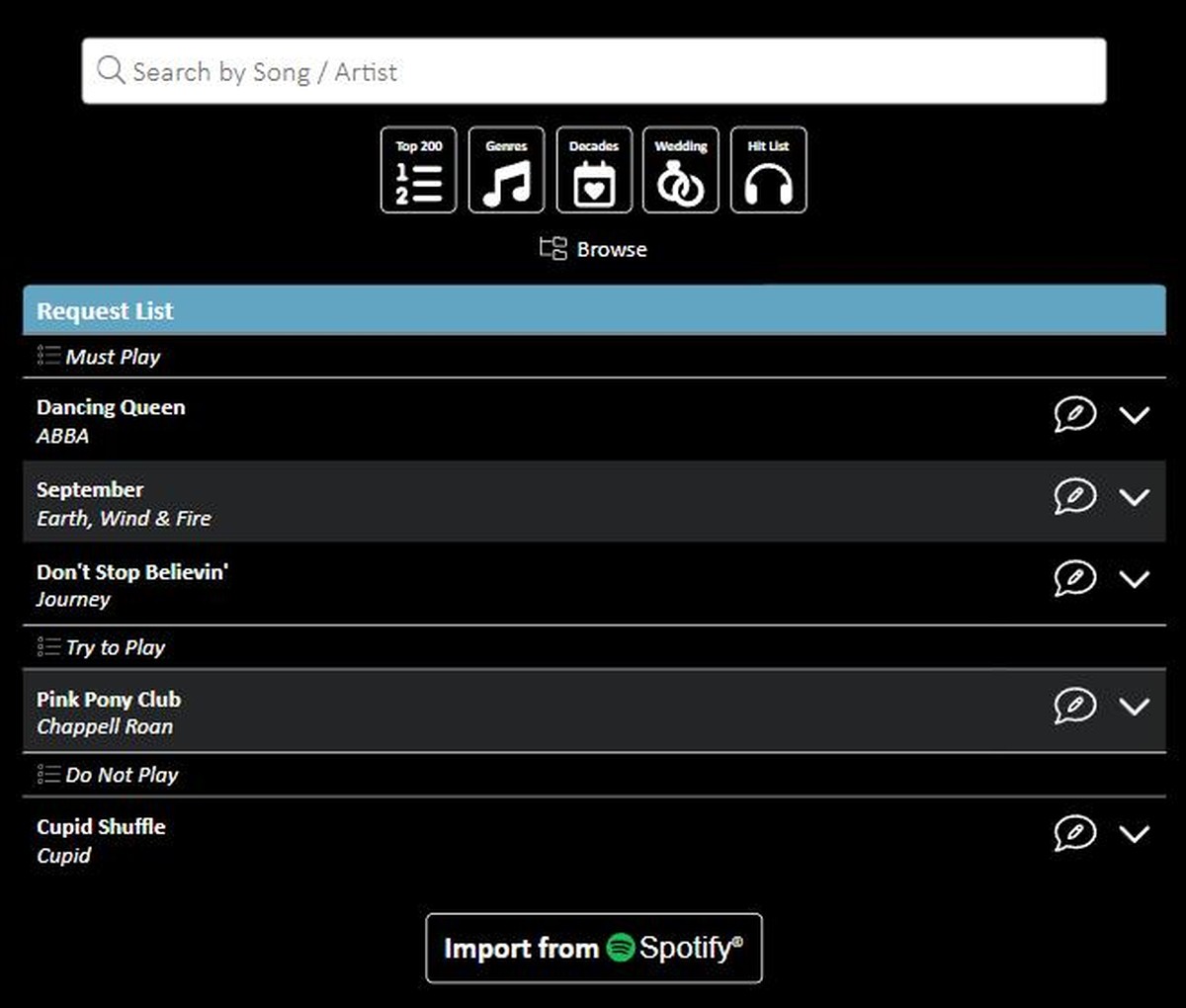
You are not handed a playlist — you build your own, out of my online music database with Spotify search alongside it. Make as many as you need: ceremony, dinner, the dance floor. Sort what you find into must-plays, try-to-plays and do-not-plays, and change any of it right up to the week of your event. Want to hand the whole thing to me instead? That’s a decision too — but you’ll never be told there’s no room for yours.
The Guest Request System
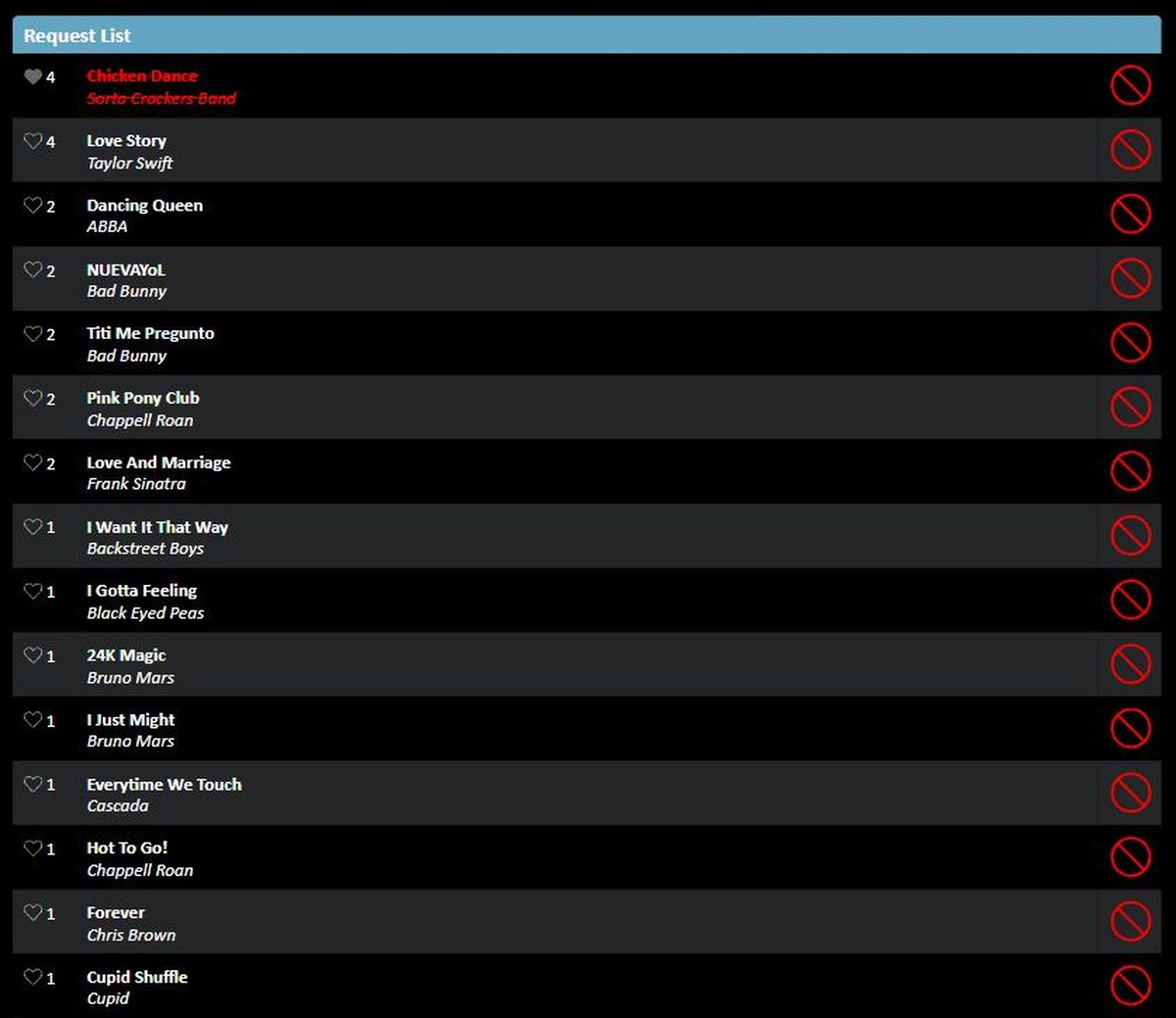
Send your guests a link, or put a QR code on the invitations, and each one gets their own request page — up to fifteen songs each, or whatever limit you set. No app and no sign-up — they tap the link and they’re in. Their suggestions come back to you as one list: song, artist, and how many different guests asked for it, most-requested first. It’s anonymous, so nobody holds back — and if something turns up you’d rather not hear, one click bans it from the night. Months out, you can see which songs several of them are waiting for, which gives you real insight into what will get your guests dancing!
Unlimited consultations
As many as you need. I don’t meter them, and there’s no point in the process where you stop being able to ask me something. Twenty-three years in means most of your questions have an answer already; the rest we work out together.
Planned on your schedule, not mine
It runs through the planning suite, email and the phone. That’s deliberate, and it’s the reason the person you plan with is the same person standing behind the decks on the day — not whoever the company assigns you once the contract is signed.
One piece of it you can use right now, before you’ve booked anything: search the music library
Create your ideal package
Pick your base, tick what you want, and your total price comes straight back, free. Build it as many times as you like and compare them — nothing is committed until you book online.
Not sure the date is even free? Check your date first — it takes a second and asks for nothing.